
Adding playlists on IPTV may seem complicated at first, but with the right steps, you can enjoy your favorite channels, movies, and series effortlessly. At EPIX IPTV, we provide easy-to-follow guides and reliable services to help you manage your IPTV subscriptions and playlists without hassle.
1. Understanding IPTV Playlist Formats
Before adding a playlist, it’s essential to know the available formats:
- M3U: A plain text file containing URLs to media streams. Supported by most IPTV apps.
- M3U8: Similar to M3U but with UTF-8 encoding, ideal for international channels.
- XSPF: An XML-based format used for more advanced setups.
Playlists may include absolute URLs (e.g., http://…) which are more reliable, or relative URLs, which can cause compatibility issues. Make sure your IPTV player supports the file type, usually .m3u or .m3u8.
For more information about IPTV technology, see our article on The Evolution of IPTV.
2. Adding an M3U Playlist to Your IPTV Player
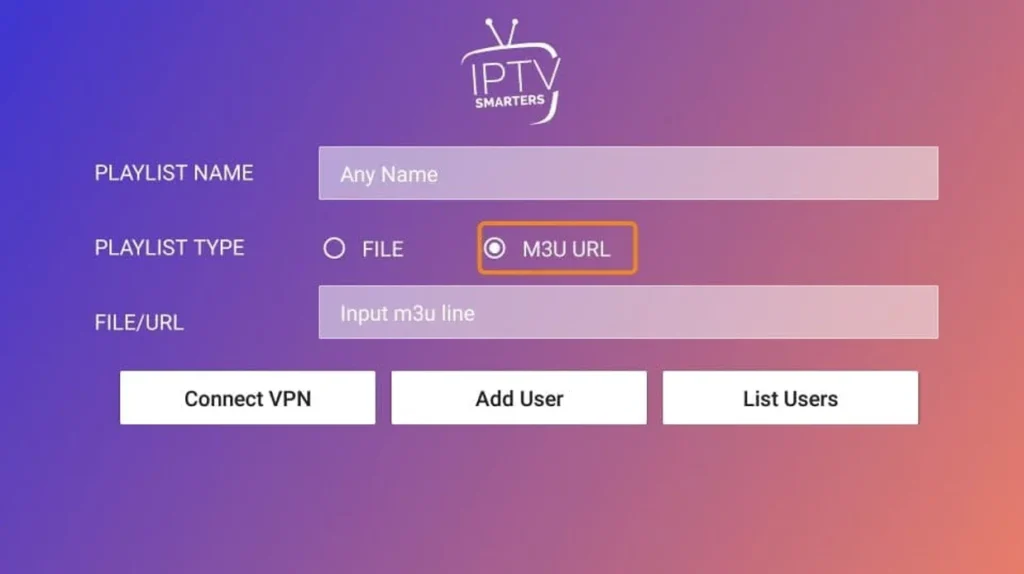
There are several ways to add playlists to your IPTV app:
- Import via URL – Paste your M3U/M3U8 link directly into the IPTV player.
- Upload a Local File – Browse and upload a playlist saved on your device.
- Use the App’s Playlist Manager – Some apps allow QR code scanning or cloud sync.
Tips if the playlist fails to load:
- Ensure a stable internet connection.
- Check that the playlist format matches your app’s requirements.
- Make sure the link isn’t expired or geo-blocked.
For step-by-step installation guides, check our tutorials:
3. Using Xtream Codes API (Alternative Method)
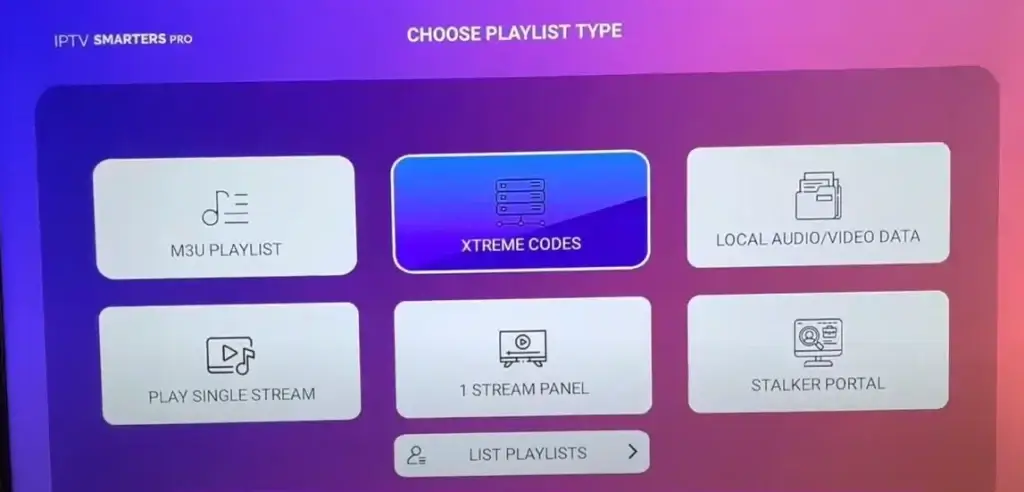
Many IPTV apps also support Xtream Codes API, an alternative to M3U playlists. You’ll need three credentials from your IPTV provider:
- Server URL (without trailing slashes)
- Username
- Password
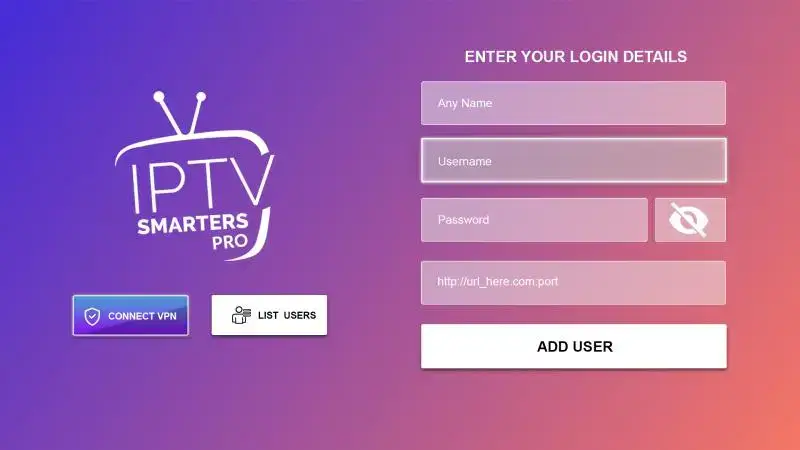
Steps:
- Open your app settings → select Xtream Codes Login or API Integration.
- Enter your credentials (case-sensitive).
- Test the connection and save.
- If channels don’t appear immediately, restart the app.
For a complete guide, see our Perfect IPTV Setup Guide 2026.
4. Troubleshooting Playlist Issues
If your channels aren’t loading properly, try these solutions:
- Confirm internet stability and firewall settings.
- Check playlist format compatibility (M3U, M3U8, XSPF).
- Clear your app’s cache and update to the latest version.
- Open the playlist URL in a browser to test.
- Replace shortened URLs with direct links.
- Verify your subscription and ensure the provider’s servers are online.
5. Managing and Organizing Multiple Playlists
A well-organized playlist ensures smooth viewing:
- Create separate folders (e.g., sports, movies, series).
- Use clear labels with provider name, date, or content type.
- Set priority lists so favorite channels appear first.
- Merge similar playlists and remove duplicates using your app’s grouping features.
- Enable automatic sorting by genre, country, or language.
- Regularly update or delete expired playlists for better performance.
For more tips on choosing IPTV services, check our article Top IPTV Providers in 2026.
Frequently Asked Questions
Is it legal to add third-party playlists?
Ensure third-party providers have broadcasting rights. Without proper licensing, sharing may violate copyright laws. Check your local regulations first.
How often should I update my IPTV playlist?
Weekly updates are recommended. If you notice buffering or dead links, update immediately. Most providers refresh content daily.
Can I share my IPTV playlist with family?
Yes! Use your provider’s multi-device settings, create separate profiles, and monitor connection limits.
What internet speed is required?
- HD streaming: Minimum 10 Mbps
- 4K streaming: Minimum 25 Mbps
Can Smart TVs use IPTV playlists without extra devices?
Some models support playlists via IPTV apps. Otherwise, external devices like Android boxes or streaming sticks may be required.
At EPIX IPTV, we make managing playlists and subscriptions simple, secure, and reliable. Explore our Pricing, Contact, and About Us pages to learn why thousands of users trust us for their IPTV needs.
Start enjoying seamless streaming today with EPIX IPTV!